Construction Takeoff Software
Measure PDF and image plans on screen, keep every area, length and count editable, then turn reviewed quantities into priced AllQuote quotes using your price book and assemblies. Plan Takeoff is a Business-plan tool.
See a measured plan and its overlay together.
This actual product screenshot uses an original fictional Coastal House plan set. The ground and upper floors are aligned in the overlay, with a measured flooring area in the priced ledger.
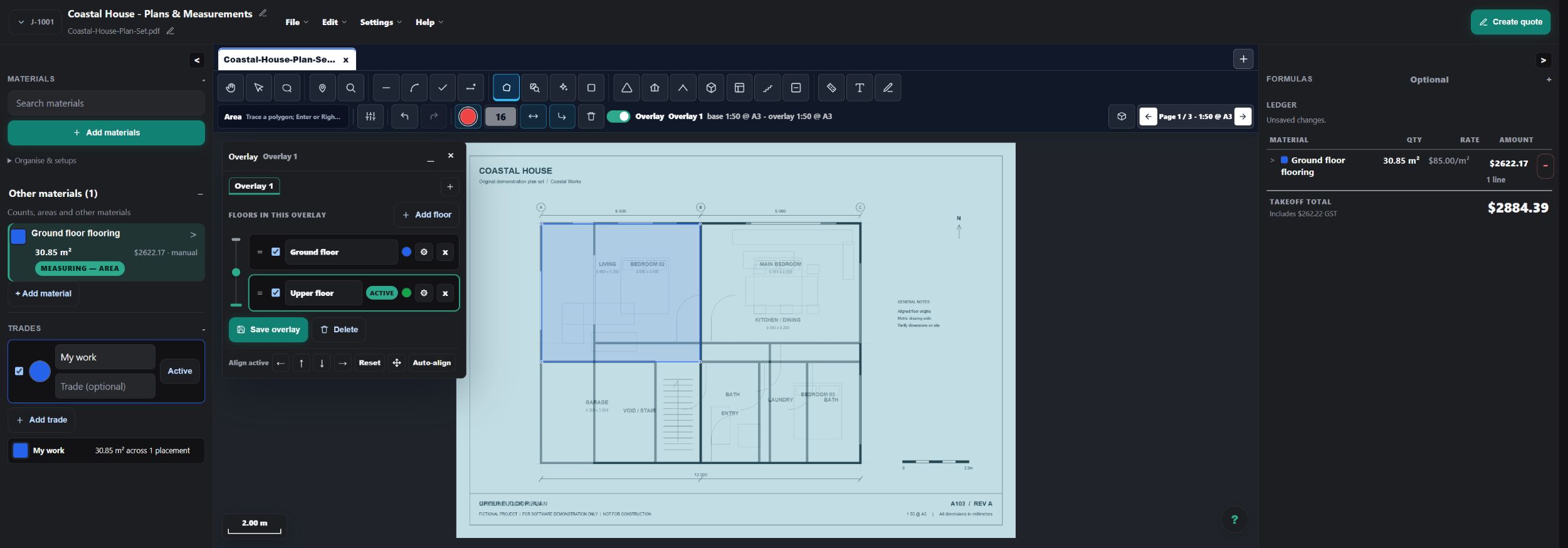
- Calibrate both source pages against known dimensions.
- Align matching reference points, then adjust tint or crossfade to compare the plans.
- Review affected measurements and their rates before inserting selected rows into a quote.
Read the takeoff quickstart or explore the construction estimating workflow.
Worked takeoff guides: driveway volume and depth, measured formulas, material and labour assemblies, and revision overlays.
Take off rooms, runs, surfaces and symbols without losing control.
Use direct drawing tools when you want precision, then use review-first shortcuts to move through repeated plan work faster.
Calibrated PDF and image plans
Detect scale from readable plan or title-block information, or calibrate against a known length. Confirm each page before measuring areas, runs, counts, volumes and deductions.
Smart Select for bounded spaces
Click inside a bounded room, floor or wall face to create a reviewable fill. Smart Select self-calibrates without a tolerance control; adjust the result or return to manual tracing when the plan needs trade judgement.
Project-wide Pattern Search
Sample a representative hatch, colour or texture region. Pattern Search self-calibrates its matching, finds candidates across the plan set, and waits for review and confirmation before creating editable areas.
Auto-count repeated symbols
Select an example symbol such as a light, fixture or window. Auto-count self-calibrates, then shows candidates for approval, rejection and correction instead of silently committing a total.
Lasso multi-select
Draw around related markups to select them together, then move or delete the selection. Separately, the Pitched area and Volume tools prompt for the roof pitch or depth their geometry needs.
Named vector surfaces
When a vector plan contains named legend surfaces, use Review surfaces to choose which ones become editable, unpriced area measurements. The review is not shown when the plan has no named legend surfaces.
Review measured work, then carry quantities into a real quote.
Takeoff is most useful when the measured work does not stop at an exported quantity list. AllQuote keeps the path open through pricing, quoting and the job record.
Measured quantities can drive formulas and assembly build-ups.
Reference a measurement label in a custom formula, such as [Wall area] * 48.5, then review and price the derived quantity. Reusable team formulas can be inserted as editable copies.
Material and labour assemblies
Map a measured row to an assembly with a compatible rate basis. Review the component quantities and prices before inserting the expanded lines into the quote.
Waste and purchasing units
Use configured component waste and whole-sale-unit rounding for quantities such as bags, packs or sheets. Review each component so allowances match the work.
Multiple layers on one measurement
Use layers and build-ups to apply more than one material or assembly to the same measured geometry, then check each layer in the ledger.
See the assembly and formula estimating examples, including the difference between maintained source prices and an issued customer quote.
Assistance that shows its work.
The editable tools are the product foundation. When detection helps, you still get the information needed to accept, reject or correct its suggestion.
See where takeoff fits in your AllQuote plan.
Feature availability, plan gates, limits, connected-provider requirements and supported workflows vary. Check the current pricing page before choosing a plan.
Questions about plan takeoff in AllQuote.
What is a construction takeoff?
A construction takeoff turns the dimensions, areas, runs and symbols on a plan into quantities for labour and materials. AllQuote keeps those measurements editable so they can be checked before pricing.
Can I take off quantities from PDF plans?
Yes. Upload a PDF or image plan, calibrate the page scale, then measure areas, lengths, counts, walls, volumes and deductions on screen. Each result remains editable and should be reviewed against the source plan.
How do takeoff measurements become a quote?
Map reviewed measurement rows to your price book items or assemblies, check the quantities and pricing, then insert the selected rows into an AllQuote quote. Supplier-sourced items can be used when they have been added to your price book.
Which trades can use AllQuote takeoff software?
Any trade that prices work from drawings can use the editable measurement tools. Common uses include electrical symbol counts, plumbing and HVAC runs, building quantities, painting and plastering areas, tiling, carpentry and landscaping.
What plan file types are supported?
AllQuote accepts PDF, PNG, JPG and JPEG, WebP, GIF, BMP, SVG and DXF plan files. Plan legibility and scale still matter, so every page and measured result should be checked before quoting.
Does AI complete the whole takeoff for me?
No. AI-assisted plan detection and automatic markup are beta and work in progress. They provide reviewable suggestions where available; they do not replace calibration, trade judgement or a final quantity and price review.