Internal forms and policies
Uploads policy PDFs that staff must read and acknowledge, and lets managers track who has acknowledged the current version of each policy.
Use policy acknowledgements to track which staff have read the current version of an internal PDF policy.
Before you start
Availability: Enterprise plan and above. Enabled business features, role permissions, connected providers and supported devices may add requirements.
Documented roles: Owner, Office. A role name alone does not override the permissions set by your business.
Where to find it: Compliance > Policies > Acknowledgements.
Upload the approved version and confirm the intended staff audience. Keep the policy clear about what the business expects.
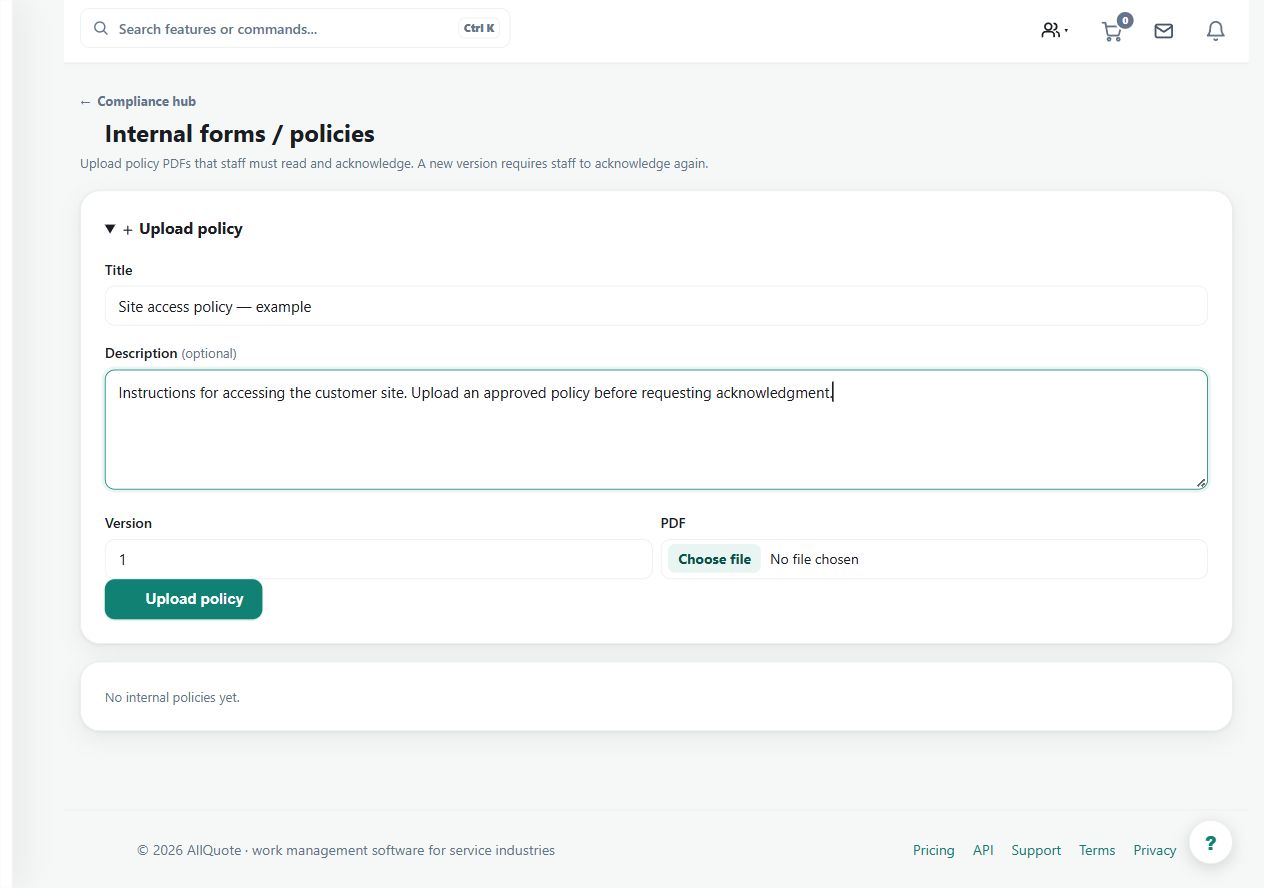
Step by step
- Open Compliance > Policies at /compliance/policies.
- Upload the policy PDF staff must read.
- Staff open and acknowledge the policy from their own account.
- Track acknowledgements per policy and re-collect them when a new version is uploaded.
Worked example
Publish a revised policy, ask staff to open and acknowledge it from their own accounts, then review the current-version acknowledgement status.
This is an illustrative scenario. Use your own approved scope, quantities, rates and business rules.
Check the result
Check each acknowledgement against the policy version rather than relying on a record for an older document.
Limits and troubleshooting
An acknowledgement records that action; it does not prove understanding, training competence or legal compliance. A new version requires fresh acknowledgement tracking.
Check current plans and feature availability · Browse every guide